Friday, June 24, 2011

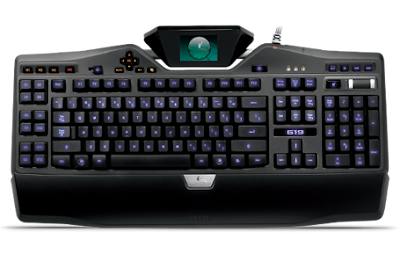
Logitech G19 Keyboard: Who is it for?

Logitech G19 Keyboard

I used to have the Logitech G15 Rev. 1 keyboard. With 18 custom assignable macro keys, a monochrome screen and built in USB 1.1 ports. It also sported 2 brightness settings for the blue backlit keyboard while also being fully usable with the lights off in full daylight. The key action was the best I personally had ever used for gaming and it was seemingly indestructible. So after having to sell it (many reasons…) I have always been on the lookout for something better.

Logitech G15 Keyboard
The Old Logitech G15 V1

I really got used to the separate LCD panel, using it to monitor stats within games and also as a system monitor, with the large clock being very useful to make sure I got to work on time, so for me the replacement was going to have to be another Logitech as other companies (quite rightly you might say) don’t see the need for a screen on a keyboard. The other day I got to play with the G19 in a shop.

Logitech G19 Keyboard

What was this thing? The keys on my old G15 were something that felt more natural than anything I had used before, or since. The new G19 keys are narrower on top and tilt back and forth a little under use. I’m sure I could get used to this but why should I have to when they had it perfect before? The option to change the backlight colour scheme to anything I want is nice, but they have done away with the 2 brightness settings. Now if you want to reduce the brightness you have to change the colour scheme to a darker colour altogether. Not impressed. And if you want to turn the backlighting off? You have to turn the screen off too (at least I didn’t find a way to keep the screen on).
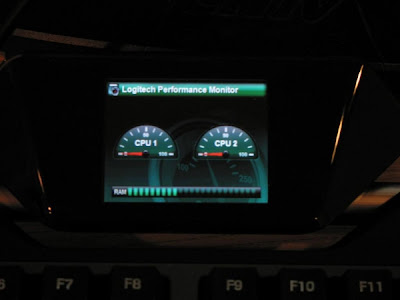
Logitech G19 LCD

Yes, the screen is full colour, has its own operating system (so hundreds of programs can be written for it down the line), and can be used to watch films while playing games, but it is also power hungry. To use this keyboard as intended you need to plug it into the wall. I have never heard of something so ridiculous. In an age of USB powered monitors this seems a major oversight. Surely they could have done away with the full USB 2 powered hubs and used 2 USB plugs to power the keyboard?

I’m unconvinced. I don’t understand who needs this keyboard. I love gadgets and toys but even for me this seems like an over the top novelty keyboard. I would much rather have a cheap plastic normal keyboard and spend my money on the G13 Advance Gameboard. In actual fact, I may just get back on eBay and buy my old keyboard…

Sunday, May 22, 2011

Mini Mod: Project Hand Baggage

Beatiful Red

After the tragic breakdown of my laptop I was left with no computer for my travels around the world. I was about to leave for Turkey and I needed some form of PC to keep me entertained and to stay connected to the world. Back in 2004 I bought myself a computer with an AMD Athlon 64 3200+ and ATI X800 GPU and was thinking that maybe that could be brought with me as hand baggage. I went back to my parent’s house, where it was stashed, and saw the size of the case I had bought for it. The Cooler Master Centurion.

It was just far too big. I needed something smaller. While thinking of a solution to this I was also thinking of how to improve on a Socket 939 motherboard without spending too much money. After asking for advice on the Bit-tech forums I got an X2 3800+ and a new graphics card. They told me to get an ATI 5450 but I got a 1GB GDDR5 5670 from a friend for next to nothing.

So new bits, still no case. On returning home to Italy my girlfriend told me she still had a computer that she bought in 1996 and that I could use that case. Ignoring the looks of the case, I measured it up and realised that it was perfect for flight hand baggage allowance. Awesome. So here is the beige goodness:

Old Computer

Saturday, April 23, 2011

Upload A YouTube Video To Blogger

Adding a YouTube video in your Blog post should be a simple task, but in reality it is not as straight forward as it seems. Follow the steps below to embed a YouTube video within any of your posts.

YouTube

First you need to find a YouTube video. Simple. Then, below the video box you will find a button labeled "Share", circled below. Click it.

Wednesday, April 6, 2011

Nuclear Free Blog!!!

Is yours a Nuclear Free blog? Do you want to show your support for a nuclear free world? Then use this image on your blog.

Right click and save the image, upload to your favorite image hosting website and share with the world.

Nuclear Free Blog

Tuesday, March 22, 2011

"It's Not A Computer Mum" Media Player PC - Toshiba U400 Mod


Just after New Year, the backlight on the screen of my Toshiba U400 decided to give up. After 7 countries, over 20 flights, 100’s of trips in my backpack, and 2 years and 2 weeks of use it wasn’t happy anymore. The simple solution to this problem is to replace the light, or if necessary get a new inverter. Boring.

Toshiba U400 Laptop Mod
Stock U400 Photo – as usual I forgot to take a picture of mine first

My better half had decided on getting a MacBook Air (I don’t really like it but I can see why some people would absolutely love it, it’s what a Netbook should be, but with OS-X) so she would be giving me her laptop, which was better than mine. Time for a project. At my parent’s house computers aren’t allowed in bedrooms until Uni. My sister is only 16 so still has some way to go. At the moment she uses the internet on the DS Lite I gave her after “Lights out” for important Facebook business. While checking emails etc. on the DS is fine, it’s not really useful. So this project was destined to be a surprise present for her when I got back from Japan.

The idea was to have essentially a media centre PC, something to keep all her music, videos and pictures. I wanted it to play the music and videos well enough for viewing from her bed (her head would be about 2.5m behind the desk) but most importantly give her the internet. Not just so she could check stuff that seems important to her (but really isn’t ) but for Skype. Me and my brother live far away from her so the only real contact we get is by phone. Currently she has to Skype on the family computer which offers no privacy, this way she would be able to talk freely (and watch BBC iPlayer from her room).